Create your first agent
Choose the browser path for an existing product workspace, or the CLI path to work with local files. Use the refund-helper starter and sample data for your first session.
Choose your environment#
| Personal local sandbox | Shared cloud deployment |
|---|---|
| Runs on your machine for experiments with sample data. A local sandbox is still personal even when it starts several services. | Runs in a cloud environment and is used by a team. A shared development deployment is also a shared cloud deployment. |
| Use the local console and the sign-in page your sandbox provides. Your drafts and usage belong to this sandbox. | Use the console URL and account supplied by your administrator. Confirm the environment and tenant before editing or running an application. |
| Practise with a separate application name. Local experiments are not automatically available to your team. | Agree who owns the application, who may edit or deploy it, who reviews held work, and who manages its budget. |
A service address tells you where requests go. The current console can label a loopback address “Hosted service”; that label alone does not mean you are connected to a shared cloud deployment.
Before you begin#
For the browser path, have your product console address, an account with console administration access, and Build enabled. Your administrator must configure model access and the execution services.
For the CLI path, first run helixor --version and helixor agent --help. Use the agent-enabled package supplied for your environment; helixor agent --help should list the agent commands. A CLI installation without agent commands is not a complete local sandbox setup.
The local editor also needs the agent runtime supplied with that package, Node.js 22 or later, and credentials for your selected model. If you only have access to a shared console, start with the browser path; no local CLI installation is needed for those steps.
The full scenario, including deployment, approvals and work lists, also needs the product server, execution pool, decision engine, and workflow service. Your administrator provides these in a shared deployment or a supplied sandbox environment.
Path A · Start in the browser#
- Sign in to the intended console and check the tenant. In a local sandbox, use the sign-in page and console it provides on your machine. Shared cloud users must use their administrator’s sign-in URL.
- Open Build → New agent.
- Name the application
customer-careand choose the refund-helper starter. The form suggests the agent namecustomer-care-refund-helper, because agent names are unique across a tenant. Use a different application name if this one already exists. - Review Instructions, Skills, Tools, and Budget. Save an instruction such as “Ask for the order number when it is missing.”
- Under Tools, select reads only for
get_orderand Save switches. Leaveissue_refundunmarked as a read. - In Talk to the draft, ask “Where is order A1001?” Inspect the read-tool result and answer.
- Read the tool status, answer, model-call count, and cost beneath the response. A successful first test shows
get_orderran and returns the sample order’s status. - Open Usage → Authoring to inspect draft-test usage. Deployed-agent operating usage is a different view.
First checkpoint: you have a checked draft and can explain which tool supplied the sample order information. Draft tests hold effects and do not create Inbox approvals.
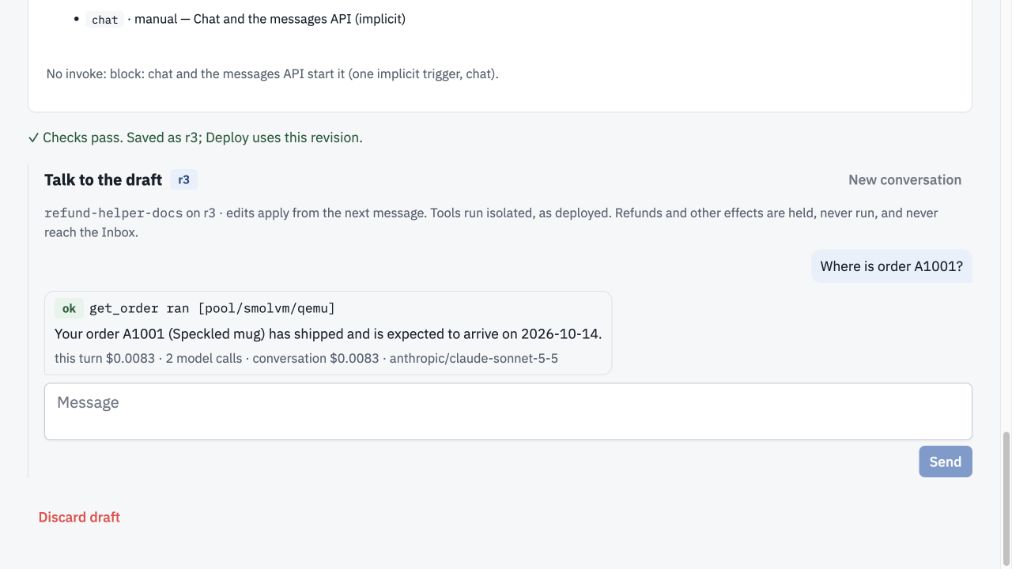
Verified on the local kit on 12 October 2026 using customer-care-docs / refund-helper-docs, draft revision 3. The tool returned a shipped sample order. Wording, dates and recorded cost can vary; this is an observed test, not a price quote.
Follow the complete browser walkthrough with screenshots →
Path B · Start with the CLI#
Run these commands in a directory where you want to create the application:
helixor agent new customer-care --application --description "Order help and support."
helixor agent new customer-care --from refund-helper
helixor agent check customer-care
helixor agent dev customer-care --port 8840
Open the local editor on port 8840 of the machine running the command. Agent names are unique across a tenant, so the CLI names the agent customer-care-refund-helper (--name picks another). The folder contains application.yaml, plus the agent’s agent.yaml, skills/, tools.py, and, because the refund-helper starter is governed out of the box, rules.yaml, work_lists/ and prompts/ (--ungoverned leaves them out). The YAML reference explains their fields and provides a complete sample application.
- Read the starter instructions and skills.
- Add the instruction “Ask for the order number when it is missing” and save.
- Confirm the check passes, then ask “Where is order A1001?”
- Inspect the tool call and returned sample order. Stop the editor with Ctrl-C when finished.
Local editor distinction: local development can execute code tools. The product console’s draft test holds effectful calls. Use starter data until you have reviewed the tools.
To see other starters, run helixor agent new --list. To add another agent later, create it inside the application folder and check the whole application again.
Next: deploy and try the live agent#
You can finish your first session with a working draft. Deployment is the next step when you want a versioned live agent. In a shared cloud deployment, coordinate with the application owner before replacing a live version.
Use the deployment guide to select the intended service and deploy the application. In the console, open Applications → customer-care → customer-care-refund-helper → Talk to vN, where N is the live version. Ask the same sample question and inspect the response.
The refund-helper starter ships governed: issue_refund is checked against its sample rules.yaml and over $100 waits for the manager role (see Rules and approvals). Those sample rules are not evidence that your organization’s refund policy has been installed.
Live-agent checkpoint: you know the application name, the live agent version, the tool used for the answer, and where a held action would appear.
See the deployment, live answer and usage screenshots for application v1, a live sample order lookup, and its operating usage. They were taken in a local sandbox; a shared cloud deployment shows the same steps against its own data.
End your practice session#
Keep the draft if you want to resume later; it remains separate from the live application. Stop a CLI editor with Ctrl-C. Before trying effects, inspect the tool implementation and approval configuration. The sample refund tool does not establish a connection to a payment provider.